Geometry Jump 3D
- 3.6
- Rating
- 1.00M
- Installs
- Free
- Price
 Analysis by App-foxy
Geometry Jump 3D is the kind of music game I can open for a quick break and understand almost immediately. The idea is simple: move through a geometric, rhythm-focused challenge, react to what appears on screen, and try to keep improving after each attempt. It does not ask me to learn a complicated control system before I can play, which makes the first few minutes feel approachable even when the timing becomes demanding.
Created by F4ntom Games, this free game sits in the music category and is suitable for Everyone. It has passed the point of being an obscure experiment, with over a million installs, although its average rating of 3.7 shows that the experience is not equally satisfying for every player. My own view is that it works best when treated as a compact reflex game rather than a full music-production or long-form adventure title.
The most important thing to understand before installing it is the type of enjoyment it offers. I would not choose it for a deep story, a large collection of systems, or a relaxed playlist in the background. I would choose it when I want a focused challenge built around movement, visual rhythm, and repeated attempts. That distinction makes a big difference: people who enjoy learning a short sequence through practice may find it engaging, while anyone looking for a broad, content-heavy game may run out of reasons to continue sooner.
You May Also Like

 Blood Strike: 2.5 Anniversary
Blood Strike’s Loadouts Turn Every Drop Into a Tactical Gamble
A close look at Blood Strike’s custom loadouts: how fast access to signature weapons reshapes its battle royale rhythm, rewards preparation, and narrows the gap between fights.

 Pandora - Music & Podcasts
Pandora’s Music Is Easy to Start, but Harder to Recover
Pandora’s strength is its low-effort path from a seed to a station. Its weak spot is how much confidence it asks you to place in connection, setup, and quiet recovery.

 8 Ball Pool
 Is Built on Rivalries, Rematches, and Routine
A close look at the rivalries, rematches, shared routines, and unanswered safety questions that turn a quick pool match into a persistent mobile community.

 Samsung Music
’s Quiet Strength Is Playing What You Already Own
Its reach comes less from spectacle than from dependable access to a personal library. That simplicity is both the app’s strongest retention engine and its ceiling.

 AccuWeather: Weather Radar
AccuWeather Review: A Quick, Clear Forecast for Everyday Decisions
For everyday plans, the best forecast is the one you can understand quickly. AccuWeather makes rain timing, radar, and local conditions easy to act on, with a few trade-offs.

 Hill Climb Racing
Why Hill Climb Racing Still Turns Crashes Into One More Run
A tiny car, a bumpy hill and one more upgrade: Hill Climb Racing keeps resurfacing because its simple chaos makes every near-miss feel personal.
More From Our News Desk



Getting from the first launch to a satisfying run
I use the first few attempts to learn the game’s visual timing rather than chase a long run straight away. That gives me a clearer way to tell whether a miss came from reacting too soon, looking at the wrong cue, or simply losing focus. Once I can name the mistake, I have a practical next step: keep the same grip and session setup, then adjust one part of my timing on the next run.
What the first launch feels like
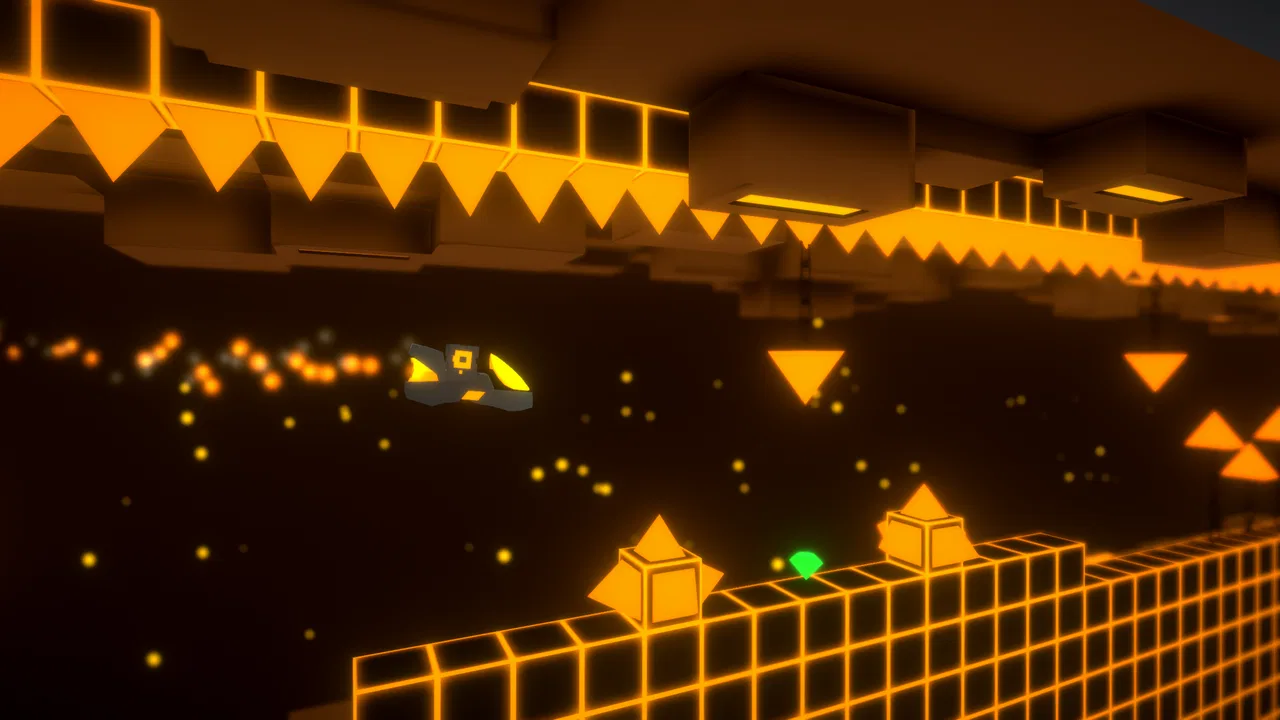
After installing the game, I recommend starting with a few minutes in which the only goal is to observe. The bright geometric presentation can make the action feel faster than it really is, especially when several visual elements compete for attention. Instead of trying to achieve a perfect run immediately, I first watch how the playable object moves, where hazards or changes appear, and how much time the game gives me to react.
This small adjustment prevents a common beginner mistake: tapping or steering because something looks important rather than because the timing is right. In a rhythm game, visual decoration and playable information can blend together. I found it more useful to identify one dependable visual cue and make that my reference point. Once that cue becomes familiar, the screen feels less busy and my reactions become more deliberate.
The game is free to download, which makes trying it straightforward. There are in-app purchases priced at $1.99 per item, so I would keep that in mind before handing the phone to a child, even though the content rating is Everyone. I also suggest checking that the device meets the minimum operating-system requirement of Android 7.1 or later. That is a practical first step because an otherwise suitable phone can still be unable to run the current release if its software is too old.
How I approach the first successful action
My first meaningful success would not be a long streak or a flawless attempt. It would be completing a short section while staying calm enough to understand why the movement worked. That is the point at which the game stops feeling like random trial and error. I can then connect a visual pattern with a physical response, which is the basic skill the rest of the experience asks me to repeat.
For a new player, I recommend using short sessions. Play until you recognize one recurring mistake, then pause and return with a single correction in mind. For example, if I react too early, I concentrate on waiting for the cue rather than trying to move faster. If I lose control after a visual transition, I focus on the transition itself during the next attempt. This method is more effective than restarting without changing anything.
There is also a useful phone-position tip that is easy to overlook. I keep the device steady and use the same grip from one attempt to the next. Changing how I hold the phone can make a familiar input feel inconsistent, especially during quick sequences. A stable posture turns the game into a test of timing instead of a test of whether my hands are shifting around the screen.
Sound can help establish the intended rhythm, but I do not rely on audio alone. In a noisy room, with headphones unavailable, or when the volume is low, I still need to read the visual timing. I treat the music as support rather than as the only source of information. That makes the game easier to enjoy in ordinary situations such as waiting for an appointment or taking a short break at home.
Where beginners usually become confused
The first source of confusion is the difference between movement and reaction. A player may assume that holding a control longer is always safer, but rhythm-based challenges often reward a precise response rather than constant input. I learned to avoid making several nervous corrections in a row. One intentional action is easier to evaluate than a blur of taps that leaves me unsure which input caused the failure.
The second issue is visual overload. Geometry Jump 3D uses a stylized geometric setting, and the changing shapes can draw my eyes away from the path that actually matters. When that happens, I deliberately look slightly ahead instead of staring at the character or the most colorful object. This gives me more time to prepare and reduces the feeling that every obstacle is arriving without warning.
A third point concerns failure. The game is built around repetition, so an unsuccessful attempt is not necessarily evidence that the controls are poor. Sometimes it reveals one specific timing gap that I have not learned yet. I try to remember the location and the type of mistake, then use the next run as a targeted experiment. If I cannot explain what went wrong after several attempts, I take a break rather than blaming the game immediately.
That said, the learning curve will not suit everyone. Players who dislike repeating a section, especially without a strong sense of progression, may find the loop frustrating. The 3.7 average rating reflects that mixed appeal more honestly than a uniformly enthusiastic score would. I see the game as a title that depends heavily on personal tolerance for practice: the same repetition that feels rewarding to one player can feel monotonous to another.
Small habits that make the game easier to read
I found three habits particularly useful. First, I lower distractions around me before starting a serious attempt. Notifications, conversation, and movement in the room can break concentration at exactly the wrong moment. Second, I use a consistent session length instead of playing until frustration takes over. Third, I change only one part of my technique at a time, so I can tell whether the adjustment helped.
Another practical habit is to separate learning runs from score-focused runs. During a learning run, I accept mistakes and pay attention to patterns. During a score-focused run, I avoid experimenting and repeat the approach that already works. Mixing those goals makes me impatient because I expect progress while still changing my method. Keeping them separate gives each attempt a clearer purpose.
I also recommend not judging the game on the first few minutes alone. The opening impression can be dominated by unfamiliar controls and visual speed. After several deliberate attempts, I get a better sense of whether the timing feels fair to me. If the rhythm begins to make sense, the simple structure becomes appealing. If it still feels arbitrary, that is a useful sign that this particular style of game may not match my preferences.
How it compares with familiar alternatives
Compared with a conventional endless runner, Geometry Jump 3D puts more emphasis on timing and visual rhythm than on simply surviving as long as possible. An endless runner may let me react to distance and obstacles in a continuous flow, while this game asks me to recognize patterns and build consistency. I prefer the latter when I want a more concentrated challenge, but I would choose the runner when I want something less mentally demanding.
It also differs from music games that focus mainly on pressing notes in lanes. Those games usually make the musical input very explicit, whereas the geometric presentation here makes spatial reading part of the challenge. That can feel more immersive for someone who enjoys movement, but it may be less comfortable for a player who wants a clear note-by-note interface.
Against large rhythm games with extensive song libraries, social systems, or elaborate progression, this title feels more compact. Its strength is that I can get to the central action quickly. Its weakness is that players seeking constant variety may prefer a bigger alternative. I would not replace a broad rhythm-game collection with it; I would keep it as a lighter option for short, focused sessions.
Who should try it, and who should skip it
I think it is a good fit for players who enjoy reflex challenges, geometric visuals, and the satisfaction of improving through repetition. It is especially suitable for someone who wants a free game that can be understood quickly without committing to a long story. The Everyone rating also makes it approachable for a wide audience, although younger players should still be supervised around optional purchases.
I would be more cautious about recommending it to people who need generous accessibility options, dislike rapid reactions, or expect a calm music-listening experience. It is also not my first choice for someone who wants a deep campaign or a large amount of content to explore. The game’s appeal comes from mastering its central challenge, not from offering many unrelated activities.
For a realistic everyday scenario, imagine having ten minutes before leaving for work or school. I can launch it, play a few attempts, and stop without needing to remember a complicated plot or manage a large inventory. If I am already tired or distracted, however, I may find the same session irritating because rhythm mistakes arrive quickly. The best time to play is when I want concentration in a small dose, not when I am looking for passive entertainment.
What to know about the current release
The current version is 1.1.4, and the game was released on January 29, 2020. Those details place it in the category of a title with an established presence rather than a brand-new launch. I would install it expecting the core experience to be the reason to stay, not assuming that a recent release cycle or constant stream of new material will be the main attraction.
Its rating comes from around 6,700 ratings and 178 written reviews, so I read the score as a sign of divided reactions rather than a final verdict. A rating in that range tells me to test the game personally and pay attention to how the controls feel on my device. Touch response, screen size, and my own rhythm-game experience can affect the result more than a single number suggests.
One of the less obvious trade-offs is the relationship between free access and optional spending. Since individual purchases cost $1.99, I can begin without paying, learn whether the basic loop suits me, and only then decide whether an optional item is worthwhile. I would not spend immediately to solve early frustration. First I would confirm that the problem is a lack of practice rather than a control style I simply do not enjoy.
My next step after the first good run
Once I complete a section with fewer mistakes, I stop trying to improve everything at once. I choose one target: cleaner timing, better anticipation, or a longer uninterrupted sequence. This keeps progress measurable even when the game does not provide the kind of elaborate checklist found in larger titles. The feeling of improvement comes from my own consistency, so a simple personal goal is surprisingly helpful.
I also suggest deciding in advance when to stop. Rhythm games can encourage “one more attempt” long after concentration has faded. When I notice that I am repeating the same careless mistake, I take a break and return later. That is not giving up; it protects the learning process. Coming back with fresh attention often teaches me more than forcing another dozen unfocused runs.
If the game clicks, I can make it part of a short daily routine: a few attempts during a commute break, after finishing a task, or while waiting for someone. I would keep the sessions brief enough that the challenge remains inviting. If it does not click after a fair trial, I would move to a more forgiving music game or a broader rhythm title rather than treating the mismatch as a personal failure.
My final recommendation is therefore fairly specific. Geometry Jump 3D is worth trying if you want a free, quick-start music game built around visual timing and repeat practice. I like its directness and the way a small improvement can make a run feel noticeably better. At the same time, its compact focus, demanding reactions, and mixed rating mean it is not a universal recommendation. Start slowly, keep the phone steady, learn one visual cue at a time, and judge it after you have given the timing a genuine chance.
For me, that is the fairest way to approach Geometry Jump 3D: not as a huge all-purpose game, but as a focused geometric rhythm challenge that can turn a few spare minutes into a satisfying test of attention. F4ntom Games has made something easy to enter, yet the value depends on whether I enjoy the process of repeating, adjusting, and finally getting a sequence right.
FAQs for Geometry Jump 3D
01What is Geometry Jump 3D and how does it differ from other jumping games?
Geometry Jump 3D is a thrilling platformer game that challenges players to navigate through intricate, geometric-themed levels. Unlike traditional 2D jumping games, this version adds a third dimension, creating more dynamic gameplay and complex challenges. The game’s unique design and visually appealing graphics set it apart, providing an engaging experience for players.
02Is Geometry Jump 3D suitable for all ages?
Yes, Geometry Jump 3D is designed to be family-friendly and is suitable for players of all ages. The intuitive controls and adjustable difficulty settings make it accessible for younger players while still offering a challenging experience for older gamers. Parents can feel comfortable knowing the game content is appropriate for children.
03Are there in-app purchases in Geometry Jump 3D?
Geometry Jump 3D does include in-app purchases, which offer players the option to buy additional features, skins, or levels. While these purchases can enhance the gaming experience, they are not necessary to progress through the game. Players can enjoy the core gameplay without spending any money, making it a flexible option for all budgets.
04Does Geometry Jump 3D require an internet connection to play?
No, Geometry Jump 3D can be played offline, making it an excellent choice for gaming on the go. However, an internet connection may be required for certain features, like downloading updates or accessing leaderboards. Players can enjoy the full offline experience without missing out on the main gameplay elements.
05What are the system requirements for Geometry Jump 3D?
Geometry Jump 3D is optimized for both Android and iOS devices. For Android, it requires version 5.0 or higher, and for iOS, version 10.0 or later is needed. The game is designed to run smoothly on most modern smartphones and tablets, ensuring a seamless gaming experience without significant lag or performance issues.
Pros
- Engaging levels with increasing difficulty.
- Smooth and responsive controls.
- Visually appealing 3D graphics.
- Addictive gameplay keeps players hooked.
- Minimal ads for uninterrupted play.
Cons
- Limited soundtrack variety.
- In-app purchases can be pricey.
- Occasional lag on older devices.
- Levels can feel repetitive over time.
- Requires constant internet connection.

Geometry Jump 3D
Gallery